How it works
One record, from application
to certificate of occupancy.
Follow a permit through the six stages your office already runs. Everything below happens inside one case record — no export, no connector, no second vendor holding the drawings.
- 01–06
- Stages, each with what the applicant sees, what staff sees, and what the system enforces.
- 0
- Connectors between intake, review, and inspections.
- 2
- Interface voices — dense for staff, calm for applicants — from one system.
- Config
- Not custom code — the reason 30 to 90 days is credible.
The permit journey
Six stages. Pick one to see all three sides of it.
Most vendors show you the staff screen. The stage that fails an implementation is usually the one where the applicant and the statute disagree with it.
Stage 01 of 06
Application intake
A project description in, a complete application out. The applicant never picks a permit code and staff never receives a form with a required field left blank.
CLOCK: not yet started — begins on acceptance, not on submission
The applicant sees
- A guided wizard that asks what you are building, not which permit class it maps to.
- The requirement list and fee estimate before payment, not after.
- Saved drafts, and one identity that works in every PermitFoundry jurisdiction.
Staff sees
- Applications arrive in the queue already matched to a permit type and fee schedule.
- Parcel, zoning, and prior-permit history attached from your GIS at submission.
- Counter intake uses the same screens, so walk-ins and online applications converge.
The system enforces
- Required documents per permit type — submission is blocked until they exist.
- Fee calculation from the published schedule, itemized on the applicant receipt.
- Every submission written to the hash-chained audit trail.
Stage 02 of 06
Completeness screening
The stage that decides whether your statutory clock is fair. A technician confirms the package is reviewable before the deadline starts running against your office.
CLOCK: starts here · day 0 of the statutory review period
The applicant sees
- Accepted, or a specific list of what is missing — never a silent queue.
- Notification on the channel you chose: app, email, SMS, or voice.
- A resubmission that keeps the original application, not a fresh start.
Staff sees
- Checklist screening with reusable rejection reasons, so wording stays consistent.
- One click to request the missing item, with the clock treated correctly.
- Fees accepted at the counter or online before acceptance, per your policy.
The system enforces
- Statutory acceptance windows tracked per permit type and jurisdiction.
- The review clock starts on acceptance and is stamped with who accepted it.
- Incomplete packages cannot be routed to reviewers by mistake.
Stage 03 of 06
Multi-department plan review
Building, Fire, Zoning, Public Works, and Health review the same drawing set at the same time, in one record, with no file leaving the system.
CLOCK: running · escalation fires before the statutory deadline is at risk
The applicant sees
- A live view of which departments are reviewing and which have finished.
- No requests for the drawings you already uploaded.
- Days remaining on the review, in plain language.
Staff sees
- Markup and comments against the sheet, pinned and colored by department.
- Assignment by discipline and current load; reassignment without losing comments.
- Contract reviewers work inside the case with scoped access.
The system enforces
- Parallel or sequential routing, exactly as configured for the permit type.
- No department can be skipped; conflicting comments are flagged, not merged.
- Every comment is attributable to a reviewer, a sheet, and a version.
Stage 04 of 06
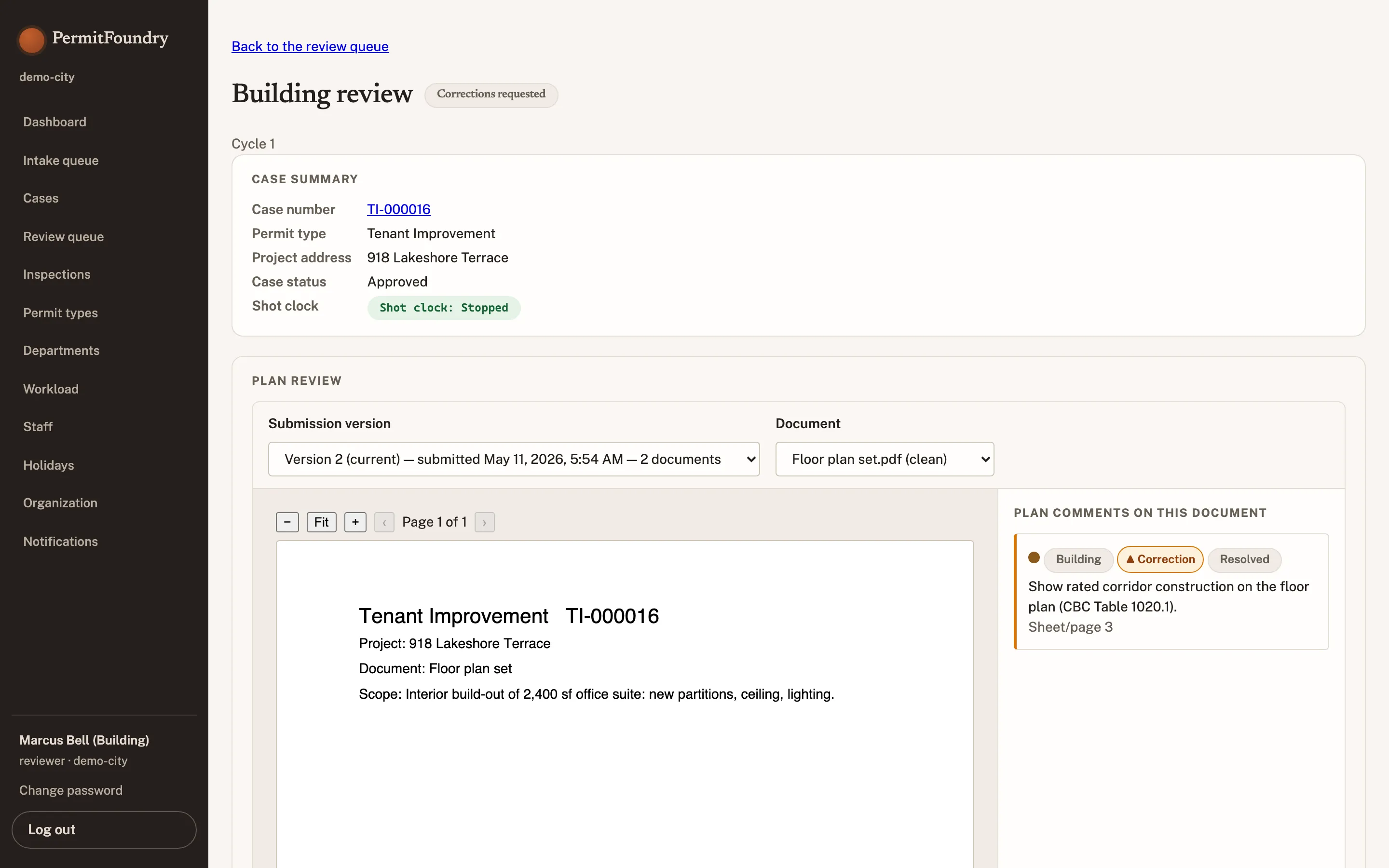
Corrections cycle
One consolidated letter out, one versioned resubmittal back. This is where multi-vendor setups lose comments and where clocks are most often computed wrongly.
CLOCK: paused · time held, not spent, while the applicant responds
The applicant sees
- Every department’s items in one letter, answered one at a time in place.
- A visibly paused clock, so waiting on you does not read as the city being slow.
- Resubmit is gated until every item has a response.
Staff sees
- The letter assembles itself from department comments, in the city’s template.
- Switch between submission versions with each cycle's comments still attached.
- Every comment stays tied to the sheet, the department, and the version it was raised against.
The system enforces
- The clock pauses on issuance of the letter and resumes on complete resubmittal.
- Superseded versions stay in the record; nothing is overwritten.
- Each cycle is counted, so repeat-correction patterns are measurable.
Stage 05 of 06
Inspections
Field work with the same record behind it. Scheduling the applicant can do without a phone call, and results the inspector can file without signal.
CLOCK: inspection response windows tracked separately from plan review
The applicant sees
- Request an inspection against the permit and see the assigned window.
- Results and any correction items on the record the same day.
- Re-inspection scheduled from the result, not from a new request.
Staff sees
- Dispatch board with inspector lanes, unassigned queue, and daily capacity.
- Assign the day's stops by route, with each inspector's remaining slots visible.
- Results recorded against the permit, so the case history stays in one place.
The system enforces
- Required inspection sequence per permit type — no final before rough.
- Re-inspection fees applied automatically per your fee schedule.
- Result, inspector, and timestamp written to the permanent record.
Stage 06 of 06
Issuance
The permit, the certificate, and a record that can be reproduced exactly as it stood on any past date — which is what a records request or an appeal actually asks for.
CLOCK: closed · elapsed statutory days recorded for the compliance report
The applicant sees
- The issued permit as a printable, QR-verifiable certificate.
- Every document, fee receipt, and inspection result in one place, permanently.
- Closeout and certificate of occupancy on the same timeline.
Staff sees
- Issue with conditions; conditions travel to the inspection checklist.
- Public lookup updates immediately — fewer status calls to your counter.
- Cycle-time, volume, and revenue reporting is a by-product, not a project.
The system enforces
- Approval authority checked against role before the permit can issue.
- Point-in-time reconstruction of the record on any past date.
- Retention schedules applied automatically at closeout.
Module 01 · the anchor
Plan review, inside the case record.
Comments, versioned resubmittals, per-department pins, and the consolidated correction letter are all part of the permit — not a file that made a round trip through a second product. Nothing expires, nothing drifts, no comment is lost on the way back.
Correction items · this version
Fire · pin 2Open
Occupant load calculation missing for assembly area A-2.
Building · pin 1Resolved in Rev 3
Egress width at stair 2 below minimum. Carried forward from Rev 2.
Zoning · pin 3Note, not a hold
Bike parking count meets minimum; confirm at final inspection.
All three assemble into one correction letter, in the city's template, with every item attributable to a reviewer, sheet, and version.
Versioned resubmittals
Every revision keeps its own comment set. Unresolved items carry forward automatically instead of being retyped.
Per-department pins
Building, Fire, Zoning, Public Works, and Health mark up the same sheet without overwriting each other.
Consolidated letters
One document to the applicant, not five emails from five departments on five days.
Outside reviewers
Contract plan reviewers work in the case with scoped access. No file transfers, no shared drive.
02
Shot clock & workflow
Configured per permit type: which departments review, in what order, in parallel or in series, and against which statutory clock. The timer pauses the moment the ball is in the applicant's court and resumes on resubmittal — so the number your city attorney reads is the number the statute means.
Running · 6 d leftPaused · awaiting applicantEscalated to coordinator
03
Inspections
Applicants request; a dispatch board assigns by inspector, discipline, and capacity, and can fill the lanes by route. Results are recorded against the permit itself, so the applicant and the rest of the department see the outcome without asking. Re-inspections are scheduled from the result, not from a new request.
- Rough framing · 118 Alder StPassed
- Rough electrical · 118 Alder StPartial · 1 item
04
Applicant experience
A guided wizard that asks about the project, not about your permit taxonomy. A status timeline in plain language that says what happens next and who has the ball. A corrections flow where each item is answered in place, with the paused clock visible the whole time.
Fewer phone calls to your counter is a staffing outcome, not a customer-service slogan.
05
Admin & configuration
Permit types, requirement checklists, fee schedules, workflows, staff roles, and tenant branding are all configuration — entered in an admin screen, versioned, and reversible.
This is the causal link: because your rules are configuration rather than custom code, there is no development cycle between contract and go-live. That is what makes 30 to 90 days a plan instead of a promise.
See implementation pricing and timelines
Two voices, one system
The same case, deliberately rendered twice.
Staff screens are dense: small type, tables, tabular numerals, every deadline on one row. Applicant screens are calm: larger type, plain language, one primary action. Same data, same permit, different job.
| Permit | Status | Rev | Clock |
|---|---|---|---|
| BLD-2026-0418 | In review | 3 | 18 d |
| BLD-2026-0419 | Corrections | 2 | Paused |
| MEC-2026-0233 | Submitted | 1 | 27 d |
| ELE-2026-0117 | Approved | 2 | — |
BLD-2026-0419 · 118 Alder Street
We need three things from you.
Your review is paused while we wait — day 12 of your 30-day review clock is being held, not spent.
Clock paused · 18 days remain when you resubmit
Respond to the three items
Bring the permit type that gives your office trouble.
Thirty minutes, your permit type, our screens. We will run it through intake, a three-department review, a corrections cycle, and issuance — on the real product.
Why there is no feature matrix here
An incumbent with twenty years of accumulated checkboxes will always win a 200-row comparison. Ask instead where a drawing leaves the system, who owns the connector, and what the clock does while the applicant holds the ball.
Read the RFP-writing guide